
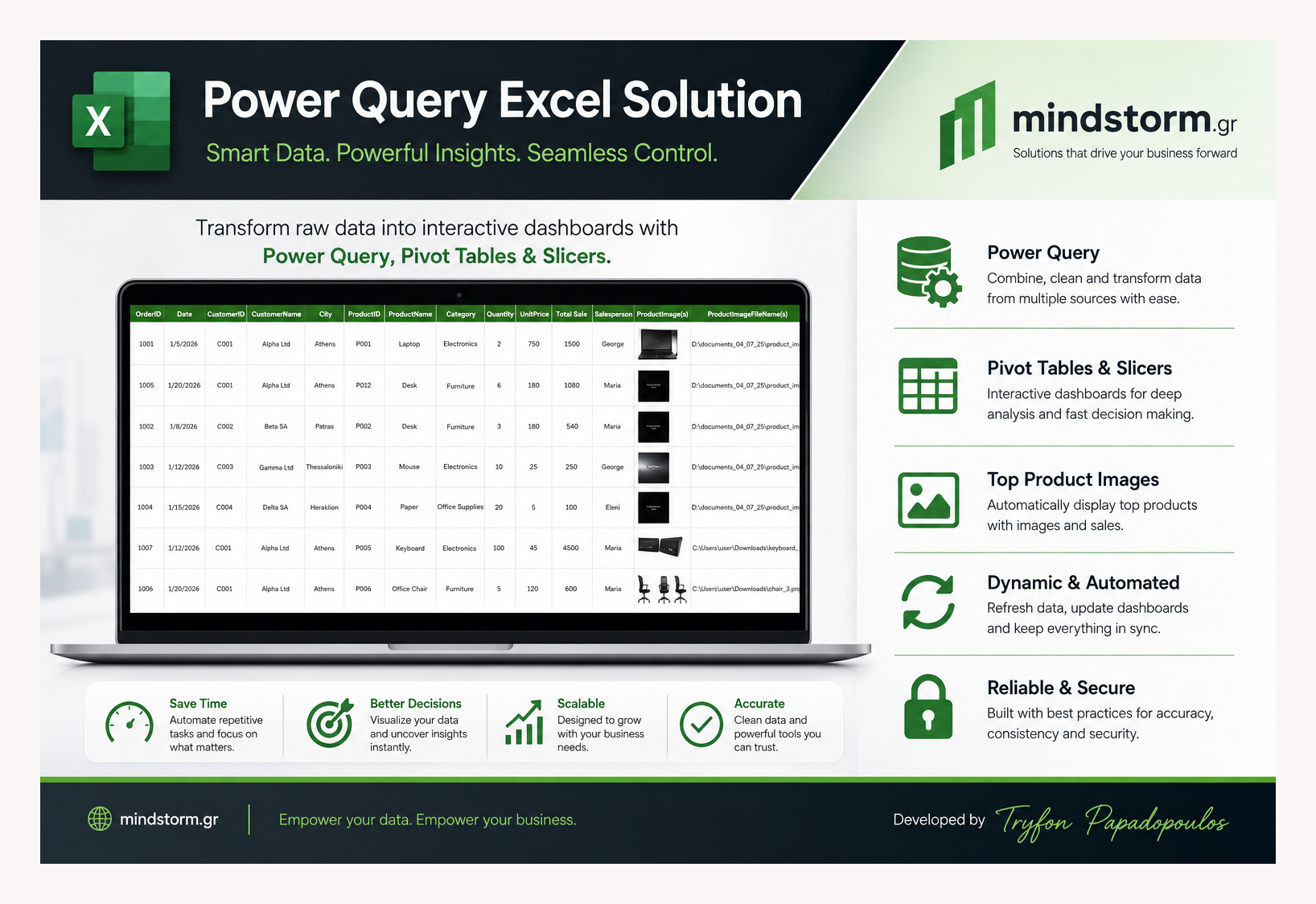
🚀 What if Excel could do far more than just spreadsheets?
From Power Query automation and interactive dashboards to dynamic product images, slicers, AI-generated descriptions, and real-time reporting — this custom Excel solution transforms raw data into business intelligence.
Built for speed. Designed for insights. Powered by automation.
📊 Smart Data. Powerful Insights. Seamless Control.
Dynamic Excel Thumbnail System with VBA & Power Query
One of the biggest limitations of Excel dashboards and mini ERP systems is image handling.
Embedding hundreds of images manually inside worksheets quickly makes Excel:
- slow,
- heavy,
- difficult to refresh,
- and almost impossible to scale.
To solve this problem, I created a dynamic thumbnail management system using:
- Power Query
- VBA automation
- external image files
instead of storing images directly inside the workbook.
 “C:\macro_enabled_excel_files\Power_Query_in_Excel.xlsm”
What This VBA System Does

The macro automatically:
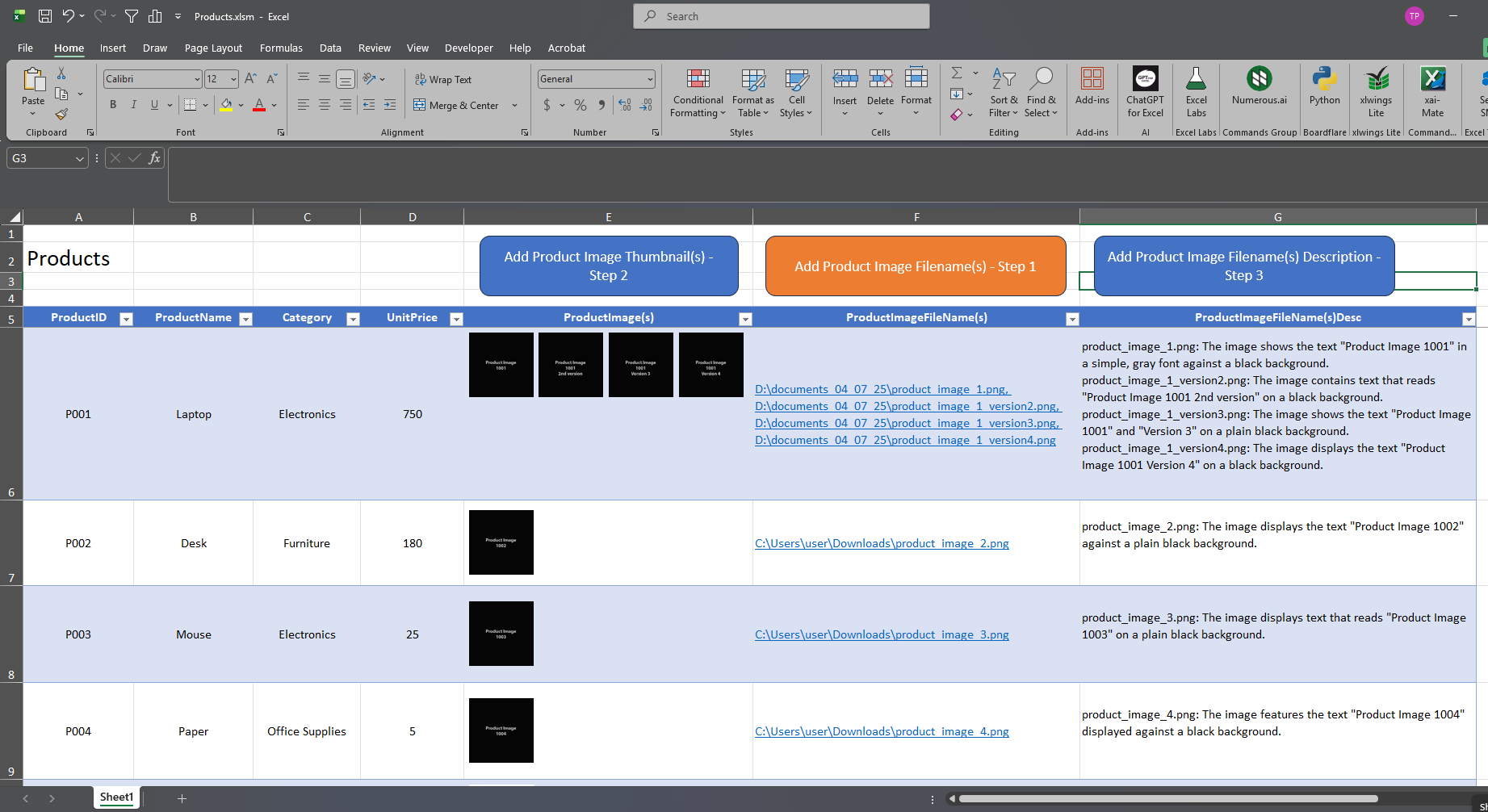
✅ Reads image file paths from a column
✅ Generates thumbnail previews dynamically
✅ Supports multiple images per product
✅ Automatically resizes rows and columns
✅ Adds clickable thumbnails
✅ Works for:
- all rows,
- selected ranges,
- or a specific row only
This creates a lightweight but visually rich product management system inside Excel.
How the System Works
Step 1 — Power Query Imports the Data
Power Query imports:
- products,
- orders,
- customers,
- image file paths,
- and other business data.
Instead of importing actual images, it imports only the image paths, for example:
D:\images\product_1.png
D:\images\product_2.png
This keeps the workbook small and fast.
Step 2 — VBA Creates Dynamic Thumbnails

The VBA macro:
- reads the image paths,
- inserts image thumbnails into worksheet cells,
- positions them automatically,
- and creates clickable image previews.
The thumbnails are generated dynamically from external files.
This means:
- the workbook stays lightweight,
- images can be updated externally,
- and Power Query refreshes remain fast.
Smart Features Included
1. Multiple Images Per Product
Products can contain:
- one image,
- or multiple images separated with commas.
Example:
D:\images\img1.png, D:\images\img2.png, D:\images\img3.pngThe macro automatically:
- splits the paths,
- inserts all thumbnails,
- and arranges them horizontally inside the cell.
2. Dynamic Column Width
The system checks:
- which row contains the highest number of images,
- and automatically expands the image column width accordingly.
This prevents thumbnails from overlapping or being cut off.
3. Automatic Row Height Adjustment
Rows are automatically resized to fit thumbnails perfectly.
The developer can control:
- thumbnail width,
- thumbnail height,
- row height,
- spacing between images.
Example configuration:
thumbW = 55
thumbH = 55
rowH = 70
gap = 4
4. Clickable Image Previews
Each thumbnail becomes clickable.
Clicking the thumbnail opens the original image file directly from Windows.
This creates a simple but powerful image management system inside Excel.
5. Flexible Thumbnail Modes
The macro supports three execution modes:
| Mode | Description |
|---|---|
| ALL | Generate thumbnails for the entire table |
| RANGE | Generate thumbnails only for selected rows |
| ROW | Generate thumbnails for a specific row |
This improves performance dramatically for large datasets.
Why This Architecture Matters
Traditional Excel image handling:
- embeds pictures directly,
- increases workbook size,
- slows filtering,
- slows scrolling,
- and eventually crashes large files.
This system avoids those problems by using:
Power Query → file paths
VBA → dynamic rendering
External files → image storage
This architecture scales much better for:
- mini ERP systems,
- inventory management,
- CRM dashboards,
- product catalogs,
- warehouse systems,
- sales reporting,
- and business intelligence dashboards.
Practical Advantages
Better Performance
The workbook remains much smaller because images are external.
Easier Maintenance
Updating an image only requires replacing the external file.
Scalable Design
You can manage thousands of products without embedding thousands of images.
Dynamic Refresh
Power Query can refresh product information automatically while VBA regenerates thumbnails only when needed.
Final Thoughts
Excel combined with:
- Power Query,
- VBA,
- and external file management
can become a surprisingly capable lightweight ERP and reporting platform.
While Excel is not designed to be a full image database system, combining:
- data automation,
- dynamic thumbnails,
- interactive filtering,
- and Power Query merges
creates professional dashboards and business tools that go far beyond traditional spreadsheets.
Developed and tested with advanced Excel automation workflows and dynamic image rendering techniques.
Customers
 Products
Orders

“C:\SalesReports\Customers.xlsx”
“C:\SalesReports\Products.xlsm”
“C:\SalesReports\Orders.xlsx”
—


Comments are closed.