YouTube link: https://www.youtube.com/watch?v=8-kiLxUJTIQ


How to prevent Duplicate Email and Phone Entries in Excel Αποφυγή διπλότυπων καταχωρήσεων ηλεκτρονικών διευθύνσεων αλληλογραφίας και τηλεφώνων Step 1 Mark All Email Cells except title. Do that before any data entry. Go To Data > Data Validation > Settings > Custom and type =COUNTIF($D$4:$D$303;D4)=1 Then go to “Error Alert” Tab and choose Style : Stop Title : Duplicate Email Found Error message : Email cannot be duplicated. Step 2 Mark All Phone Cells except title. Do that before any data entry. Go To Data > Data Validation > Settings > Custom and type =COUNTIF($E$4:$E$303;E4)=1 Then go to “Error Alert” Tab and choose Style : Stop Title : Duplicate Phone Found Error message : Phone cannot be duplicated. YouTube link: https://youtu.be/7S3iAqiwhHs Filename: form_VBA_2_prevent_duplicates_2.xlsb Download zip file of excel file #excel_tips #softexperia
How to include the content of a Word file in a Wordpress post? To include the content of a Word file in a WordPress post, including formatting and any background colors or styles from the Word file, you can follow these steps: Method 1: Copy and Paste with Formatting Open the Word Document: Open your Word file and make sure the content is formatted the way you want. Copy the Content: Select all the content in the Word document, including any background or styles, and press Ctrl+C (or Cmd+C on Mac). Paste into the WordPress Block Editor: In WordPress, go to your post or page. Add a new block and select the Paragraph block or Classic block. Paste the content (Ctrl+V or Cmd+V). Check Formatting: WordPress retains basic styles like bold, italic, and background colors, but advanced Word features (e.g., floating text boxes) may need manual adjustments. Method 2: Export…

Automate Your Excel Workflow: How to Add Month-Year and Year Columns with a Simple VBA Macro! VBA code Sub AddMonthYearColumn() Dim ws As Worksheet Dim lastRow As Long Dim dateColumn As String Dim outputColumn As String Dim outputColumnYear As String Dim outputColumnC As String’ Define the worksheet Set ws = ThisWorkbook.Sheets(1) ‘ Change the sheet index or name as needed’ Define the columns outputColumnC = “C” ‘ The column for Country & Product dateColumn = “G” ‘ Adjust to the actual column containing dates outputColumn = “H” ‘ The column where the “Month-Year” data will be added outputColumnYear = “I” ‘ The column where the “Year” data will be added’ Find the last row in the Date column lastRow = ws.Cells(ws.Rows.Count, dateColumn).End(xlUp).Row’ Add header for the new column Month-Year ws.Cells(3, outputColumn).Value = “Month-Year” ws.Cells(3, outputColumn).Font.Bold = True’ Add header for the new column Year ws.Cells(3, outputColumnYear).Value = “Year” ws.Cells(3, outputColumnYear).Font.Bold…


7 things to ask an employer in a job interview / Τι μπορείς να ρωτήσεις τον άνθρωπο που σου παίρνει συνέντευξη για δουλειά και να κερδίσεις τις εντυπώσεις; EN Can you describe a typical day in this type of role? How long have you been at the company and what makes you stay? How would you describe the work environment and corporate culture? What are some of the goals for the company in the short and longer term? How would my performance be measured? What types of career opportunities may open up down the road for a person starting out in this position, assuming they perform well? What are some of the company’s initiatives regarding learning and development? GR 1. Μπορείτε να περιγράψετε μια τυπική μέρα αυτής της θέσης εργασίας στην εταιρεία σας; 2. Πόσο καιρό εργάζεστε στην εταιρεία και τι σας κρατάει εκεί; 3. Πώς θα περιγράφατε το εργασιακό…

How to Automate Data Retrieval from ChatGPT API in Excel Using VBA This VBA script automates the process of fetching data from OpenAI’s ChatGPT API and populates an Excel spreadsheet with structured information. This tutorial breaks down the script, explaining its purpose, key features, and how to use it effectively. Purpose The script connects to the OpenAI API, sends user prompts, retrieves responses, and organizes the data into specific columns in an Excel sheet. It’s particularly useful for tasks like gathering summarized information for a list of items (e.g., countries). Key Components of the Code Initialization vba Dim http As Object, JSON As Object Dim apiKey As String, url As String Dim ws As Worksheet http: Handles HTTP requests. JSON: Parses the JSON response. apiKey: Your OpenAI API key for authentication. ws: Refers to the active worksheet where data is processed. API Key and Endpoint vba apiKey =…
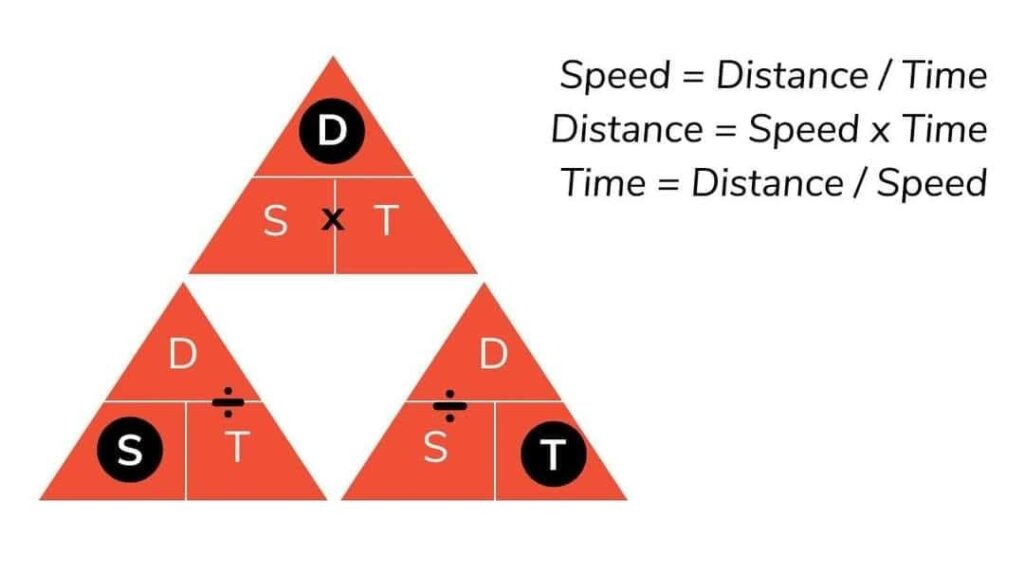
Speed | Distance | Time Example for speed < Distance / Time > 150 metres / 25 seconds = 6 metres per second Example for distance < Speed x Time > 6 metres per second x 25 seconds = 150 metres Example for time < Distance / Speed > 150 metres / 6 metres per second = 25 seconds #softexperia #mindstormGR

GR – Ένα παιδί που δεν το αποδέχτηκαν, τρέχει μια ζωή για να φτάσει κάπου. Θέλει να φεύγει. Να κινείται συνεχώς. Αναζητά εμμονικά την αποδοχή σε κάθε έκφανση της ζωής του. Στο σχολείο, στον αθλητισμό, στη δουλειά, στη σχέση. Θέλει να είναι πρώτο. Να συμμετέχει. Να το αναγνωρίζουν. Να γίνεται αισθητή η παρουσία του. Ακόμα όμως και όταν αυτό το παιδί τα καταφέρνει, και γίνεται αποδεκτός ως ενήλικας, η μνήμη της απόρριψης των παιδικών χρόνων του μερικές φορές το βασανίζει. Μιλήστε όσο μπορείτε περισσότερο στα παιδιά. Να ξέρετε ότι άλλοτε θα σας μιλούν και άλλοτε θα σας αγνοούν. Μπορεί και να σας περιγελούν. Εσείς συνεχίστε να ακούτε και να κάνετε ερωτήσεις. Να δίνετε κάποια παραδείγματα σωστών και λανθασμένων επιλογών. Τόσο των δικών σας όσο και των άλλων. Βοηθήστε τα να καταλάβουν περισσότερα για τις φοβίες και τις αδυναμίες των ανθρώπων. Και πρωτίστως αποδεχτείτε τα για το τι είναι και όχι…

This table and explanation provide a breakdown of invoices and customers based on specific conditions like date range, status, and city. Here’s the detailed explanation: Input Conditions Start Date: January 3, 2022 End Date: February 14, 2022 Status: Paid City: Athens These conditions filter the data to only include invoices and customers: Within the date range from 1/3/2022 to 2/14/2022. Having the status “Paid.” (For customers) belonging to Athens city. Metrics Calculated Count of Invoices (Start Date, End Date, Status): 3 Formula: =SUM((Date>=C3)*(Date<=D3)*(Status=E3)) Filters rows where the Date is between 1/3/2022 and 2/14/2022 and Status = Paid. From the table: Reese Withpoon (1/24/2022, Paid) Clint Eastwood (2/14/2022, Paid) Kanye East (1/18/2022, Paid — excluded from “City: Athens” but counted here). Sum of Invoices (Start Date, End Date, Status): 934 Formula: =SUM((Date>=C3)*(Date<=D3)*(Status=E3)*Amount) Sums the Amount for invoices where the conditions above are true. Breakdown: Reese Withpoon: 279 Clint Eastwood: 231 Kanye…

Ringing the bell / Χτυπώντας το κουδούνι Each floor a name. An entity. A different person. A different view. A different mind. A different story. A different bell. Let’s learn from each other. Κάθε όροφος ένα όνομα. Μια οντότητα. Ένα διαφορετικό πρόσωπο. Μια διαφορετική οπτική. Ένα διαφορετικό μυαλό. Μια διαφορετική ιστορία. Ένα διαφορετικό κουδούνι. Ας μάθουμε ο ένας από τον άλλο. #vintage #diversity #bell #κουδούνι #mindstormGR

A better version of yourself Don’t say “Sorry to bother you”. Say “I have a question for you. Could you spare me a couple of minutes?” Don’t say “Goodbye.” Say “See you”. Don’t say “I like it“. Say “It is pleasant”. Don’t say “Tell me”. Say “I’m listening”. Don’t say “You go first”. Say “After you”. Don’t day “You are welcome”. Say “My pleasure.” Don’t say “Shut up”. Say “Be quiet”. Don’t say “I don’t know”. Say “Let me find out”. Don’t say “I think”. Say “I believe“. Don’t say “Calm down”. Say “Take it easy”. Don’t say “Good luck”. Say “All the best”. Don’t say “I’m busy”. Say “I’m tied up right now. Can we talk later?”. Don’t say “I don’t care”. Say “It doesn’t matter to me”. Don’t say “That is impossible”. Say “Can we find a solution?” Don’t say “Leave me alone”. Say “Can we talk later?“.…

Here are some reasons why a user might find this Drive Analyzer tool useful: 1. Efficient Storage Management Identify Large Folders and Files: The tool helps users quickly locate large folders and files consuming significant disk space. Set Size Thresholds: Users can focus on folders/files above a specified size threshold, saving time during analysis. 2. Interactive Folder Exploration Drill-Down Navigation: Users can click on folders to view their contents without leaving the application, making it easier to explore the directory structure. Dynamic Updates: The results are displayed dynamically, providing an interactive and seamless browsing experience. 3. Comprehensive Disk Insights Disk Summary: Displays the total, used, and free space of the analyzed disk, giving users a clear picture of their storage status. Timestamped Analysis: Records the date and time of the analysis, useful for tracking changes in disk usage over time. 4. Export and Documentation Excel Export: Allows users to save…

Here’s a detailed explanation of the terms VIEWS, ACTIVE USERS, EVENT COUNT, and NEW USERS in the context of a 28-day period in Google Analytics: VIEWS (also referred to as Pageviews) Definition: A view occurs when a user loads a page or screen of your website or app. What it represents: The total number of times pages or screens were viewed during the 28-day period. Key considerations: If a single user views the same page multiple times, each visit is counted as a separate view. Views include both new visitors and returning visitors. Use in analysis: It helps measure the overall activity and popularity of your content. ACTIVE USERS Definition: Users who have engaged with your website or app in some way during the selected period. What it represents: In the 28-day window, Active Users are unique individuals who have initiated at least one session (e.g., clicked, scrolled, or triggered…

GR – Είναι κακό να προβάλλεις τον ευατό σου; Να αναδεικνύεις το εγώ σου; Να δείχνεις τη δουλειά σου; Και βέβαια όχι. Αν μάλιστα δεν έχεις τις κατάλληλες γνωριμίες ή τα απαραίτητα κεφάλαια, επιβάλλεται να το κάνεις μόνος σου. Το θέμα είναι να το κάνεις σωστά και με μέτρο. Να δείχνεις τι κάνεις, να το κάνεις συστηματικά, να εκμεταλλεύεσαι την τεχνολογία και τα κοινωνικά δίκτυα, να διορθώνεις τα λάθη σου, να ακούς και να μην ξεπερνάς κάποια όρια. Γιατί όταν τα ξεπερνάς, δείχνεις το λιγότερο αστείος και το χειρότερο καταλήγεις βασιλιάς χωρίς βασίλειο. * Πάσα ομοιότητα με την πραγματικότητα είναι τυχαία. Ή όχι; EN – “Is it wrong to promote yourself? To showcase your ego? To present your work? Absolutely not. In fact, if you lack the right connections or sufficient resources, it’s essential to do it yourself. The key is to do it thoughtfully and in moderation. Showcase…

The table provided explains how to use INDEX and MATCH functions to retrieve specific values based on a selected Product ID. Here’s a breakdown of the setup: Table Layout Columns: Product ID, Product Sales Value, Product Category, Product Description, and Sales Person. User Input: The user selects a Product ID (e.g., 7 in cell H8). Goal: Display the corresponding data (Sales Value, Category, Description, and Sales Person) in separate cells based on the selected Product ID. Explanation of the Formulas Each formula retrieves data from a specific column of the table using a combination of INDEX and MATCH. Formula for Product Sales Value (I8) =INDEX($F$8:$F$14;MATCH(H8;$A$8:$A$14;0)) $F$8:$F$14: The range containing the Product Sales Value. MATCH(H8;$A$8:$A$14;0): H8 contains the selected Product ID (e.g., 7). $A$8:$A$14 is the range of Product IDs. MATCH finds the row where H8 matches a value in $A$8:$A$14. INDEX uses the row number from MATCH to return the…

How VLOOKUP Works The VLOOKUP function allows you to search for a value in the first column of a specified range and return a value in the same row from another column. Its syntax is: =VLOOKUP(lookup_value, table_array, col_index_num, [range_lookup]) Breaking it down: lookup_value: The value you want to look up (e.g., Product ID in cell H8). table_array: The range where the data is located (e.g., $A$7:$F$14). col_index_num: The column number in the table from which you want to retrieve data. [range_lookup]: Use FALSE for an exact match or TRUE for an approximate match. Example: Retrieving Product Information Suppose you have a table where: Column A contains Product IDs, Column B contains Product Descriptions, Column C contains Sales Quantities, Column D contains Product Categories, Column E contains Sales Persons. Column F contains Sales Values. If you enter a Product ID in H8, you can use VLOOKUP to return related information. Formulas:…