Python Quiz Take the test



15 Multiple Choice Questions about Financial Analysis (Balance Sheet – Income Statement – Cash Flow Statement) 1. What is the main purpose of balance sheet analysis? A. Calculation of VATB. Evaluation of the company’s financial positionC. Control of salesD. Preparation of the budget 2. What does total assets represent on the balance sheet? A. The company’s profitsB. The company’s liabilitiesC. The resources owned by the companyD. Cash flows 3. Which of the following belongs to current assets? A. BuildingsB. MachineryC. InventoryD. Long-term loans 4. What does the current ratio measure? A. Profitability of the companyB. Ability to cover short-term liabilitiesC. Speed of receivables collectionD. Relationship between equity and liabilities 5. What does the liabilities side of the balance sheet include? A. Revenues and expensesB. AssetsC. Liabilities and equityD. Cash flows 6. Which ratio is used to evaluate capital structure? A. Liquidity ratioB. Profitability ratioC. Leverage ratioD. Inventory turnover ratio 7.…

Overall assessment of an image and a text for branding 1. How it reads for branding Strong points • Clear, memorable structure: The repetition + progression (further → clearer → higher) is excellent for brand recall. • Verb-led and aspirational: It positions the brand as enabling transformation, not just describing aesthetics. • Versatile: It can live comfortably across website headers, social visuals, printed matter, or motion graphics. Brand personality it signals • Visionary • Elevated / premium • Introspective but powerful • Slightly mystical, but grounded enough to feel intentional Brand fit • Works especially well for brands in: o creative direction / art / fashion o consciousness, insight, or transformation o editorial or conceptual platforms o boutique studios or collectives Overall branding score: 8.5 / 10 (It’s strong and clean; the only limitation is that it’s broad by design.) ________________________________________ 2. How it lands emotionally for first-time viewers Immediate…

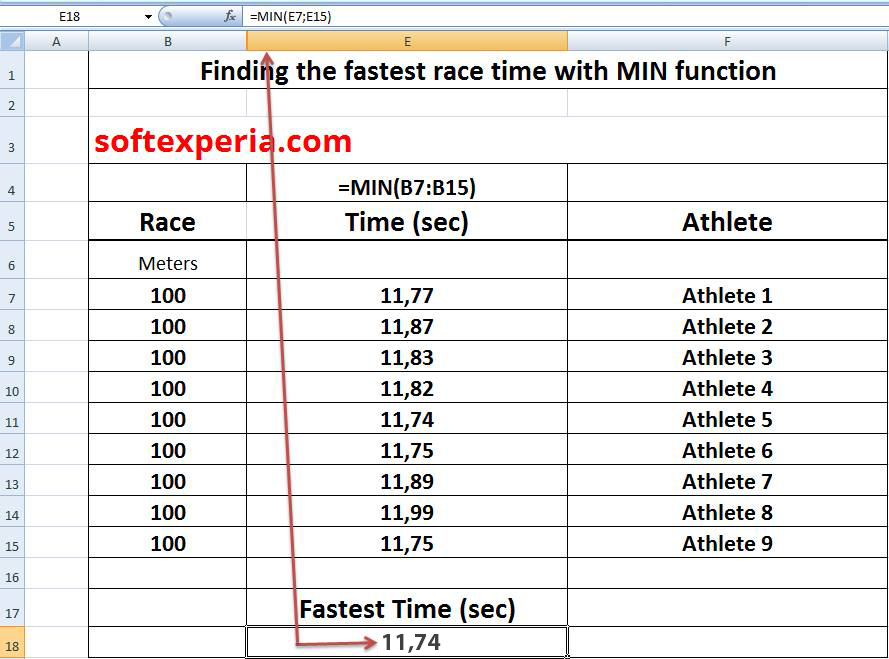
Finding the fastest race time with MIN function softexperia.com Type for cell E18 =MIN(B7:B15) Race Time (sec) Athlete 100 11,77 Athlete 1 100 11,87 Athlete 2 100 11,83 Athlete 3 100 11,82 Athlete 4 100 11,74 Athlete 5 100 11,75 Athlete 6 100 11,89 Athlete 7 100 11,99 Athlete 8 100 11,75 Athlete 9 Fastest Time (sec) 11,74 #excel_tips #calculations #softexperia
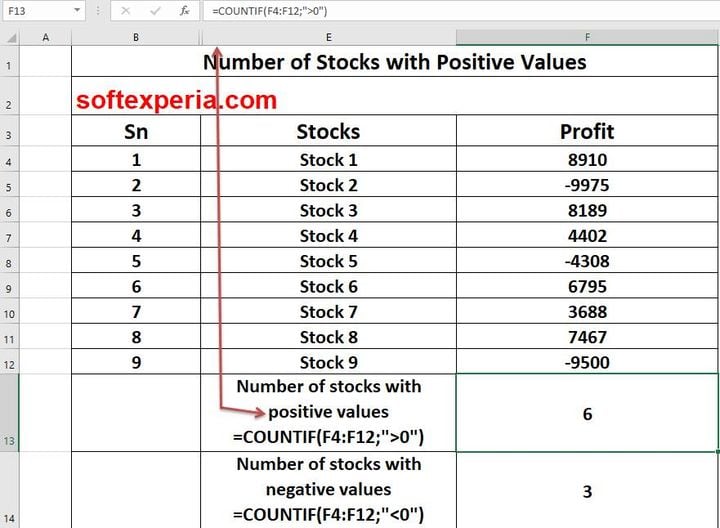
Number of Stocks with Positive Values Sn Stocks Profit 1 Stock 1 8910 2 Stock 2 -9975 3 Stock 3 8189 4 Stock 4 4402 5 Stock 5 -4308 6 Stock 6 6795 7 Stock 7 3688 8 Stock 8 7467 9 Stock 9 -9500 Number of stocks with positive values F13=COUNTIF(F4:F12;”>0″) 6 Number of stocks with negative values F14=COUNTIF(F4:F12;”<0″) 3 #excel_tips #softexperia
📊 Excel Skills Assessment Quiz Test your Excel knowledge and see how you perform. This interactive quiz evaluates your understanding of core Excel concepts, including formulas, functions, cell references, and logical operations. You’ll answer a set of multiple-choice questions and receive immediate feedback along with a visual summary of your results. After completing the quiz, you will: ✅ See your score and skill level📋 Review your answers alongside the correct ones📊 View a visual breakdown of correct and incorrect responses⏱️ See the time it took you to complete the quiz📄 Download your results as a PDF for future reference Whether you’re a beginner or refreshing your Excel fundamentals, this quiz provides a quick and clear assessment of your current skill level. 👉 Start the Excel Quiz when you’re ready — your completion time will be recorded automatically. Excel Quiz



Bad language kills good deals. Instead of: “What’s your budget?” Try: “What investment range makes sense for this?” Instead of: “I’m just following up” Try: “I have new insights about your market challenge…” Instead of: “Trust me on this” Try: “Here is the data that supports this approach…” Instead of: “There is no-brainer” Try: “Let me show you why this makes strategic sense” Instead of: “I’II be honest with you” Try: “Based on what you’ve shared, here’s my recommendation…” Instead of: “Are you the decision maker?” Try: “Who else would be involved in evaluating this solution?”



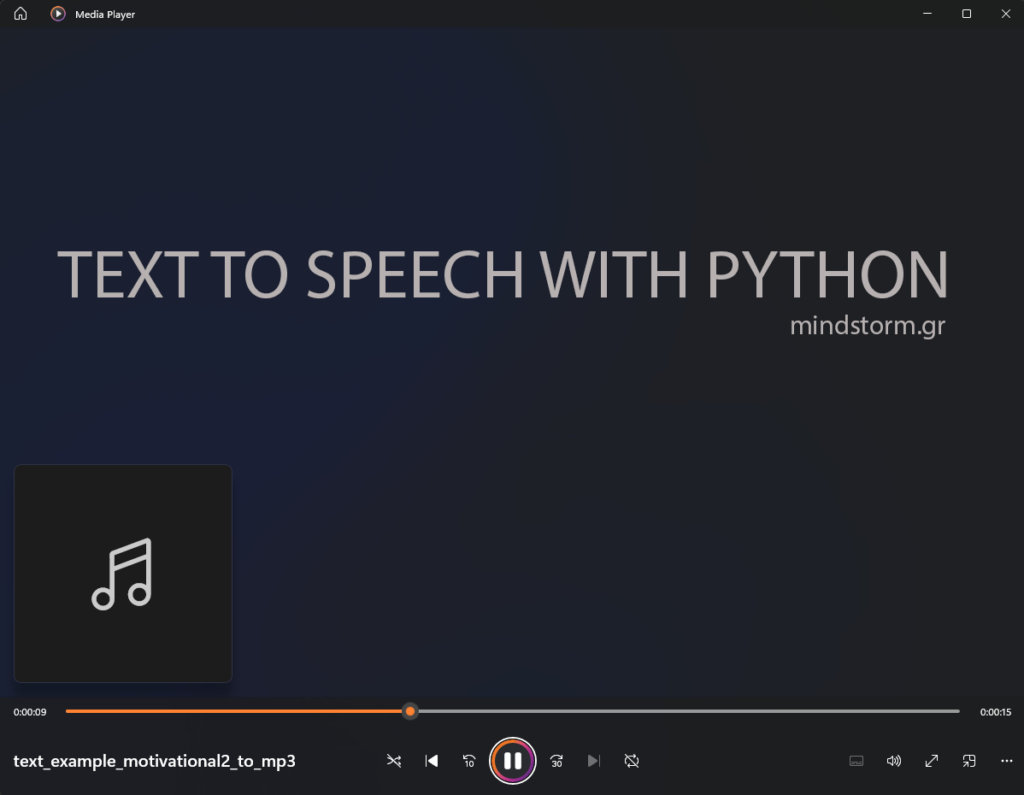
Content of text file : text_example_motivational2.txt “Python is a great programming language to convert text to speech. What you are about to hear is an example of text to speech. You are being presented with two choices. Evolve or repeat. People never want to be part of the process but they want to be part of the outcome. The process is where you figure out who is worth being part of the outcome. Feel free to visit my blog mindstorm.gr to read more about business, marketing, communication, web design and coding.” Folder: C:\PythonPrograms\pdf_to_mp3\ Male voice – File created (mp3): welcome_4.wav — Python script main11.py to convert text to speech : text_example_motivational3_gr.txt to welcome_4.wav – Male voice Female voice – File created (mp3): welcome_3.mp3 — Python script main10.py for Female voice Περιεχόμενο αρχείου κειμένου : text_example_motivational3_gr.txt “Η Python είναι μια γλώσσα προγραμματισμού για τη μετατροπή του γραπτού λόγου σε προφορικό. Αυτό…


This is a step-by-step action plan for creating an educational blog, mapped directly to each stage of a decision-making process. This translates abstract decision steps into practical actions you can actually do. Receiving Information Actions to take: Identify your goal for the educational blog (e.g., teach skills, support students, share research). Collect information about: Your target audience (age, education level, needs, problems). Existing educational blogs in your niche. Common questions and learning gaps in your subject area. Gather internal information: Your expertise, available time, budget, and technical skills. Collect external information: Trends in education (online learning, micro-learning, AI tools, etc.). Evaluating Relevance, Quality, and Quantity of Information Actions to take: Filter the collected information by asking: Is this information useful for my blog goal? Is the source credible and up to date? Remove irrelevant or outdated data. Prioritize information that: Directly addresses learner needs. Shows proven success (high-traffic blogs, strong…