
Advanced Excel Shortcuts Every Power User Should Know
If you work daily with Excel reports, dashboards, financial models, ERP exports, or large datasets, learning advanced keyboard shortcuts can dramatically improve your speed and productivity.
Instead of constantly navigating through menus and ribbons, professional Excel users rely on keyboard shortcuts to:
- work faster,
- navigate large datasets instantly,
- manage worksheets efficiently,
- automate repetitive tasks,
- and improve overall workflow accuracy.
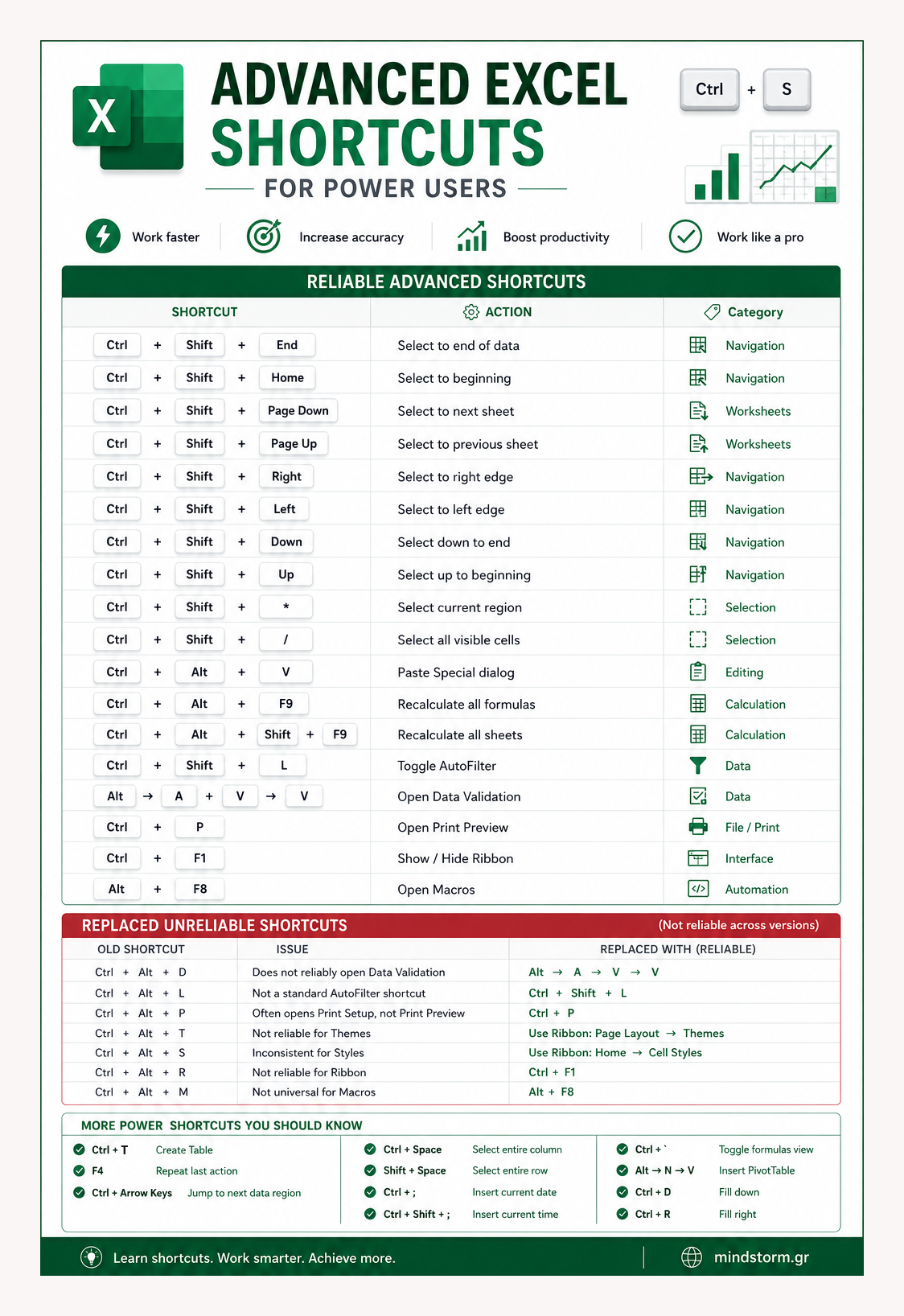
The infographic and tables above include a collection of reliable and practical Excel shortcuts that are widely supported across modern Excel versions.
Reliable Advanced Excel Shortcuts
Data Navigation & Selection
These shortcuts help you move and select data quickly inside large spreadsheets:
- Ctrl + Shift + End → Select data to the last used cell
- Ctrl + Shift + Home → Select back to the beginning
- Ctrl + Shift + Right / Left / Up / Down → Select data ranges instantly
- Ctrl + Shift + * → Select the current data region
- Ctrl + Shift + / → Select all visible cells
These commands are extremely useful when working with:
- sales reports,
- inventory files,
- accounting sheets,
- business dashboards,
- or exported ERP data.
Worksheet & Workbook Management
Managing multiple worksheets becomes much easier with these shortcuts:
- Ctrl + Shift + Page Down → Move to the next worksheet
- Ctrl + Shift + Page Up → Move to the previous worksheet
These are particularly useful in:
- monthly reports,
- budgeting workbooks,
- forecasting models,
- and multi-sheet dashboards.
Editing & Calculation Shortcuts
Some shortcuts can significantly reduce repetitive work:
- Ctrl + Alt + V → Open Paste Special
- Ctrl + Alt + F9 → Recalculate all formulas
- Ctrl + Alt + Shift + F9 → Recalculate all sheets
These are essential for:
- financial analysis,
- KPI dashboards,
- formula-heavy workbooks,
- and data modeling.
Reliable Productivity Shortcuts
The updated infographic also replaces older or unreliable shortcuts with more accurate modern Excel alternatives:
| Function | Reliable Shortcut |
|---|---|
| Toggle AutoFilter | Ctrl + Shift + L |
| Open Data Validation | Alt → A → V → V |
| Print Preview | Ctrl + P |
| Show / Hide Ribbon | Ctrl + F1 |
| Open Macros | Alt + F8 |
These shortcuts are more reliable across:
- Excel 2016,
- Excel 2019,
- Excel 2021,
- and Microsoft 365.
Additional Power Shortcuts Worth Learning
To further improve your Excel workflow:
| Shortcut | Action |
|---|---|
| Ctrl + T | Create Table |
| Ctrl + Arrow Keys | Jump across data regions |
| Ctrl + Space | Select entire column |
| Shift + Space | Select entire row |
| Ctrl + ; | Insert current date |
| Ctrl + Shift + ; | Insert current time |
| Ctrl + ` | Toggle formula view |
| Alt → N → V | Insert PivotTable |
Why These Shortcuts Matter
Small keyboard shortcuts may seem insignificant at first, but over time they can save:
- hours of repetitive work,
- countless mouse clicks,
- and unnecessary navigation through Excel menus.
For analysts, accountants, marketers, business owners, students, and Excel power users, mastering these shortcuts can make daily spreadsheet work faster, cleaner, and far more efficient.
Work smarter. Save time. Improve productivity.
| Shortcut | Function |
|---|---|
| Ctrl + Shift + End | Select to end of data |
| Ctrl + Shift + Home | Select to beginning |
| Ctrl + Shift + Page Down | Select to next sheet |
| Ctrl + Shift + Page Up | Select to previous sheet |
| Ctrl + Shift + Right | Select to right edge |
| Ctrl + Shift + Left | Select to left edge |
| Ctrl + Shift + Down | Select down to end |
| Ctrl + Shift + Up | Select up to beginning |
| Ctrl + Shift + * | Select current region |
| Ctrl + Shift + / | Select all visible cells |
| Ctrl + Alt + V | Paste Special dialog |
| Ctrl + Alt + F9 | Recalculate all formulas |
| Ctrl + Alt + Shift + F9 | Recalculate all sheets |
| Ctrl + Shift + L | Toggle AutoFilter |
| Alt → A → V → V | Open Data Validation |
| Ctrl + P | Open Print Preview |
| Ctrl + F1 | Show/Hide Ribbon |
| Alt + F8 | Open Macros |
Additional Reliable Power Shortcuts You Can Use
| Shortcut | Function |
|---|---|
| Ctrl + T | Create Table |
| F4 | Repeat last action |
| Ctrl + Arrow Keys | Jump across data |
| Ctrl + Space | Select entire column |
| Shift + Space | Select entire row |
| Ctrl + ; | Insert current date |
| Ctrl + Shift + ; | Insert current time |
| Ctrl + ` | Toggle formulas view |
| Alt → N → V | Insert PivotTable |


Comments are closed.