
📘 Microsoft Word: Πώς δημιουργούμε έναν αυτόματο Πίνακα Περιεχομένων Αρχάριοι Χρόνος εκμάθησης: 5–7 λεπτά Όταν δημιουργούμε μια εργασία, μια αναφορά ή ένα πολυσέλιδο έγγραφο στο Microsoft Word, συχνά χρειάζεται να προσθέσουμε έναν Πίνακα Περιεχομένων. Αντί να πληκτρολογούμε χειροκίνητα τους τίτλους και τους αριθμούς των σελίδων, μπορούμε να αφήσουμε το Word να δημιουργήσει τον πίνακα αυτόματα. Βήμα 1: Εφαρμόζουμε στυλ στις επικεφαλίδες Από την κορδέλα εργαλείων (Ribbon) επιλέγουμε: Κεντρική (Home) Στυλ (Styles) Επικεφαλίδα 1 Επιλέγουμε έναν τίτλο στο έγγραφό μας και εφαρμόζουμε το κατάλληλο στυλ: Επικεφαλίδα 1 (Heading 1): Για κύρια κεφάλαια. Επικεφαλίδα 2 (Heading 2): Για υποκεφάλαια. Επικεφαλίδα 3 (Heading 3): Για μικρότερες υποενότητες. Προσοχή: Δεν αρκεί να κάνουμε έναν τίτλο έντονο (Bold) ή να αυξήσουμε το μέγεθος των γραμμάτων. Πρέπει να εφαρμόσουμε το κατάλληλο στυλ επικεφαλίδας. Βήμα 2: Επιλέγουμε πού θα τοποθετηθεί ο πίνακας Τοποθετούμε τον δρομέα στο σημείο όπου θέλουμε να εμφανιστεί ο Πίνακας Περιεχομένων, συνήθως μετά το…
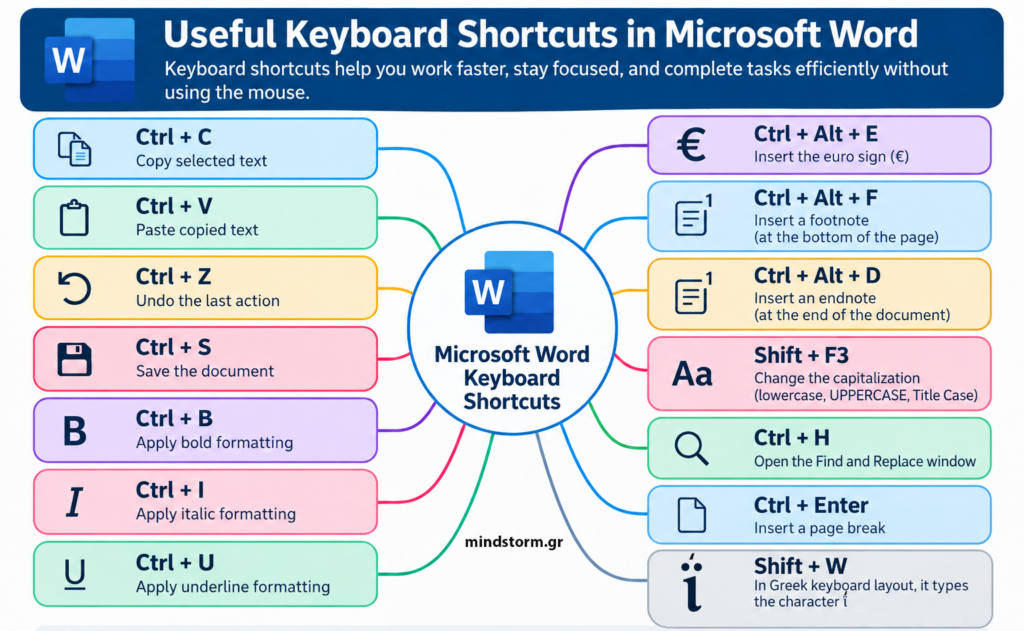
Useful Keyboard Shortcuts in Microsoft Word Keyboard shortcuts help you work faster, stay focused, and complete tasks efficiently without using the mouse. Basic Editing Shortcuts Shortcut Function Ctrl + C Copy selected text Ctrl + V Paste copied text Ctrl + Z Undo the last action Ctrl + S Save the document Ctrl + B Apply bold formatting Ctrl + I Apply italic formatting Ctrl + U Apply underline formatting Special Shortcuts in Word Shortcut Function Ctrl + Alt + E Insert the euro sign (€) Ctrl + Alt + F Insert a footnote at the bottom of the page Ctrl + Alt + D Insert an endnote at the end of the document Shift + F3 Change capitalization (lowercase, UPPERCASE, Title Case) Ctrl + H Open the Find and Replace window Ctrl + Enter Insert a page break Shift + W Used with the Greek keyboard layout for the…
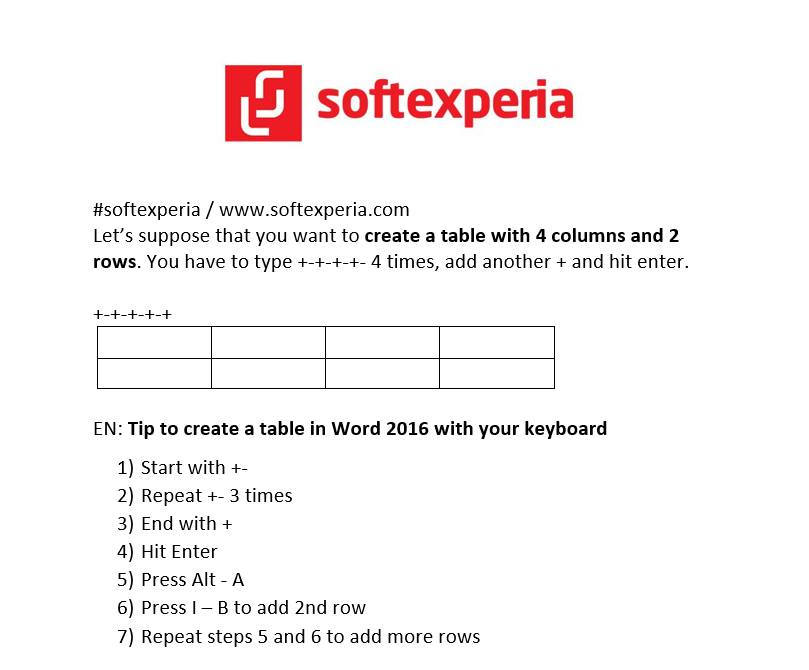
#softexperia / www.softexperia.com Let’s suppose that you want to create a table with 4 columns and 2 rows in Word. You have to type +-+-+-+- 4 times, add another + and hit enter. +-+-+-+-+ EN: Tip to create a table in Word 2016 with your keyboard 1) Start with +- 2) Repeat +- 3 times 3) End with + 4) Hit Enter 5) Press Alt – A 6) Press I – B to add 2nd row 7) Repeat steps 5 and 6 to add more rows GR: Συνδυασμός πλήκτρων για να δημιουργήσεις γρήγορα έναν πίνακα στο Word 2016 1) Ξεκίνα με +- 2) Πρόσθεσε +- 3 φορές 3) Τελείωσε με + 4) Πάτησε το Enter 5) Πάτησε το συνδυασμό πλήκτρων Alt – A για να μαρκάρεις την 1η γραμμή του πίνακα 6) Πάτησε το συνδυασμό πλήκτρων I – B για να προσθέσεις 2η γραμμή 7) Επανέλαβε τα βήματα 5 και…