Boy Helps Amputee Friend Injured in War in Naples, Italy – By Henri Cartier Bresson, 1944 . . . #τι_δεν_καταλαβαίνεις
How to use the FILTER function to display students who scored 91 or higher EN – Here’s what’s happening: On the left, there’s a table labeled “Students” with two columns: Name (column B) Score (column C) The formula in cell E6 is: =FILTER(B6:B12, C6:C12 >= 91, “No results”) This formula filters the list of student names (B6:B12) and returns only those whose scores (C6:C12) are greater than or equal to 91. If no students meet that condition, it shows “No results” instead. The filtered results — Anna, Maria, and Bill — appear in column E. The text box on the right explains the filter formula and shows its syntax. The highlighted cell (E6) contains the first filtered result, “Anna”. Essentially, the image shows how to use the FILTER function in Excel to extract specific rows that meet a given condition. Download the excel file: filter_function.xlsx *Important This is the right…
Let’s try more not to eat each other alive / Ας προσπαθήσουμε περισσότερο για μην φάμε ο ένας τον άλλο ζωντανό Photo : Greg Buchan * Χρησιμοποιήστε τις ατέλειες σας. Αποδεχθείτε ότι κανείς μας δεν είναι τέλειος. Το τέλειο, εκτός από το ότι είναι ανέφικτο, μπορεί να είναι και αφόρητα βαρετό. FB Tags: #life #συμπεριφορά #κοινωνία #άνθρωποι #peace #ειρήνη
GR – Ένα ποτήρι νερό και όμως τόσες πολλές οπτικές και αναγνώσεις. Εδώ π.χ. βλέπετε 9 απ’ αυτές. Την αισιόδοξη, την απαισιόδοξη, τη ρεαλιστική, τη φυσική, τη σουρεάλ, τη σχετική, την ουτοπιστική, τη σκεπτικιστική και την καλλιτεχνική. Άντε να συνεννοηθούμε. Τελικά είναι πολύ εύκολο ή μάλλον αρκετά δύσκολο να επικοινωνήσουμε, να καταλάβουμε και να πράξουμε. EN – It is only a glass of water and people see it in so many different ways. Here you see 9 of them. Is it so easy or so difficult to communicate, understand and act after all? #softexperia
Outlook Email Exporter GR – Ανακάλυψε τον πιο εύκολο τρόπο να «τραβήξεις» ό,τι e-mail χρειάζεσαι από το Microsoft Outlook, ακριβώς όπως το θέλεις! Με λίγα κλικ διαλέγεις γραμματοκιβώτιο/φάκελο, θέτεις έξυπνα φίλτρα (ημερομηνίες, αποστολέας, παραλήπτες, λέξεις-κλειδιά, μόνο με συνημμένα ή συγκεκριμένα ονόματα) και πατάς Export για άμεση εξαγωγή σε Excel. Η εφαρμογή αξιοποιεί το Outlook Restrict για ταχύτητα, κρατά log για έλεγχο, και σου εμφανίζει αναδυόμενο μήνυμα επιβεβαίωσης με το αποθηκευμένο αρχείο. Ιδανικό για reporting, ελέγχους, αρχειοθέτηση και οργάνωση—γρήγορα, καθαρά, επαγγελματικά. EN – Discover the easiest way to pull exactly the emails you need from Microsoft Outlook—just the way you want them! With a few clicks, choose your mailbox/folder, set smart filters (dates, sender, recipients, keywords, only with attachments or specific attachment names), and hit Export for instant Excel output. The app leverages Outlook Restrict for speed, keeps a verification log, and shows a confirmation popup with the saved file. Perfect…
Here’s a simple HTML dashboard that calculates the monthly payment, total cost of the house, and displays an amortization schedule along with a chart. This example uses JavaScript for calculations and Chart.js for the chart visualization. Mortgage Dashboard House Price: $1,450,000 Downpayment: $625,000 Loan Amount: $825,000 Interest Rate: 3.75% Loan Term: 25 years Click Mortgage Dashboard to view it. # Explanation: 1. Calculations: – The monthly payment is calculated using the formula for an amortizing loan. – The total cost of the house includes the down payment and total payments over the loan term. 2. Amortization Schedule: – The schedule is generated for each year, showing the beginning balance, ending balance, principal paid, interest paid, and cumulative totals. 3. Chart: – A line chart visualizes the cumulative principal and interest paid over the years using Chart.js.
The FILTER function in Excel is used to extract a subset of data from a range based on specified criteria. It allows you to filter rows that meet certain conditions, making it easier to analyze specific data without altering the original dataset. # Syntax: “`excel FILTER(array, include, [if_empty]) “` – array: The range of data you want to filter. – include: A logical condition that determines which rows to include. – if_empty: (optional) The value to return if no rows meet the criteria. # Example: Suppose you have the following data in cells A1:B5: | Name | Score | |——-|——-| | John | 85 | | Jane | 90 | | Mike | 75 | | Anna | 95 | If you want to filter out students who scored above 80, you can use the following formula: “`excel =FILTER(A2:B5, B2:B5 > 80, “No results”) “` This will return: | Name…
English Here’s what the sheet + macros do, in plain English: Column D (blue instructions area) Each cell in D9:D… uses the formula =LABS.GENERATIVEAI(“Analyze the sentiment of the following text: ” & Cx) to ask the AI to analyze the sentence in the same row of Column C. So C = input text, D = the AI’s answer. Copy Column D → Column F (button “Copy Column D to Answer to Revise”) The macro scans rows from the top down to the last data row, which it finds by looking in Column D for a placeholder text “<last_row>” and using the row just above it. For each row where Column G = “y”, it copies the value from D (AI answer) into F (“Answer to Revise”). Rows with G = “n” are skipped. Export to Word (button “Copy Answer to Revise to Word”) The macro again uses the same last…
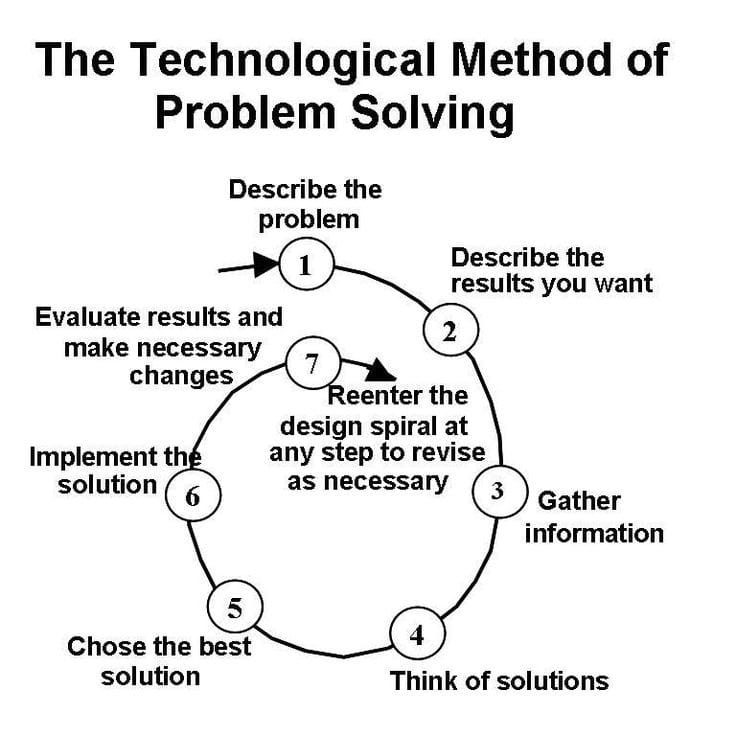
The seven steps of arguing with ourslelves 1. What is the belief that I have? 2. What evidence is there to challenge this view? (The case for the prosecution.) 3. If the evidence isn’t enough: What alternative explanations are there to explain the situation? 4. If the alternative explanations and the evidence aren’t enough: What are the real consequences if my belief is correct? (So what?) 5. If you still hold on to your original belief: How useful is it to have this view? 6. Given the argument with myself, what do I need to do to improve the situation? 7. What will I do? When? Mirror, mirror One overly common and unhelpful self-belief that people have is ‘I am not attractive’. It comes in many forms, from ‘I will never find someone who wants to marry me’, through ‘No one ever looks at me in that way anymore’ to…