

Automated Excel Analysis System (WordPress + Railway + Python API)
🎯 1. Introduction
In this video, I will demonstrate a private Excel Data Analysis system built using Python, Flask, Pandas, OpenPyXL, and ReportLab.
The application is deployed on Railway as a backend API, and it is integrated inside a private WordPress post, where the file upload interface is hosted.
The entire workflow runs online — upload the file in WordPress, the data is processed on Railway, and the results are returned instantly.
🌐 2. Architecture Overview (Brief but Analytical)
The architecture is simple and scalable:
- WordPress hosts the front-end upload form
• The form sends the Excel file to a Flask API deployed on Railway
• Railway processes the file
• The API returns:
– A cleaned & analyzed Excel file
– A professional PDF report
• WordPress displays download links automatically
This separates frontend presentation from backend processing, making the system modular and scalable.
Let’s get started.
📂 3. Uploading the Excel File
Here we are inside a private WordPress post.
I upload a raw Excel dataset.
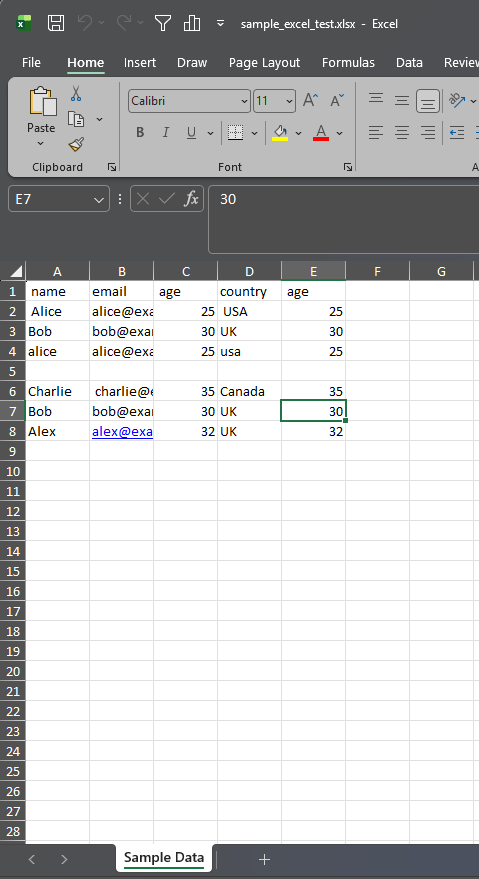
The file is sent securely to the Railway-hosted API for processing.
Download the file: sample_excel_test-1.xlsx
🧹 4. Data Cleaning & Standardization
Once the file reaches the API, the system performs automated cleaning:
- Removes fully empty rows
• Standardizes column names
• Removes duplicate columns
• Removes duplicate rows
• Converts blank cells into proper null values
• Normalizes text formatting
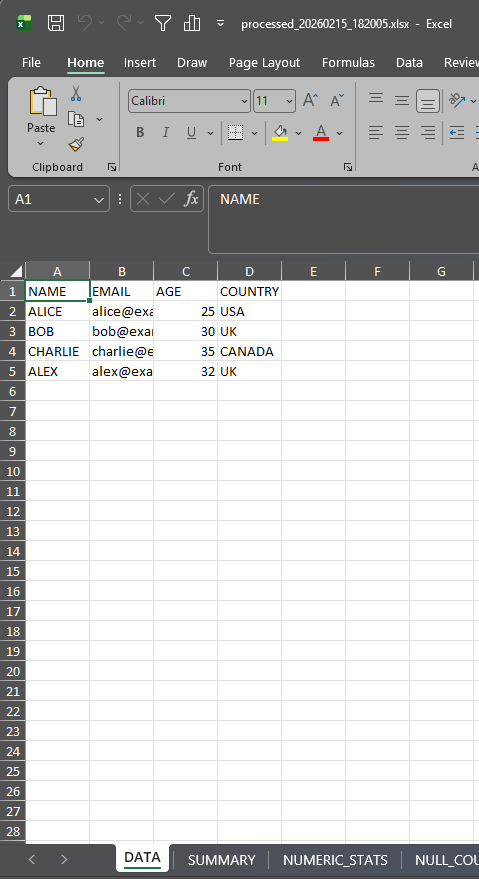
This ensures consistent, reliable data before analysis begins.
📊 5. Metrics & Data Quality Evaluation
The system then calculates structured quality metrics:
- Number of rows and columns
• Duplicate rows removed
• Total null values
• Data Quality Score
The quality score gives an immediate health indicator of the dataset.
📈 6. Statistical & Distribution Analysis
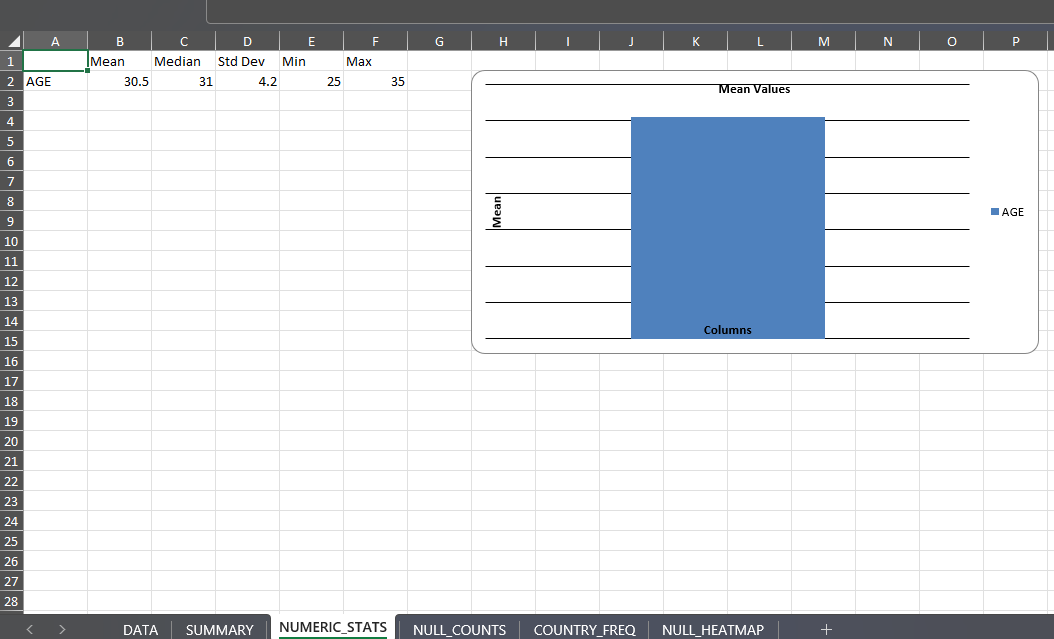
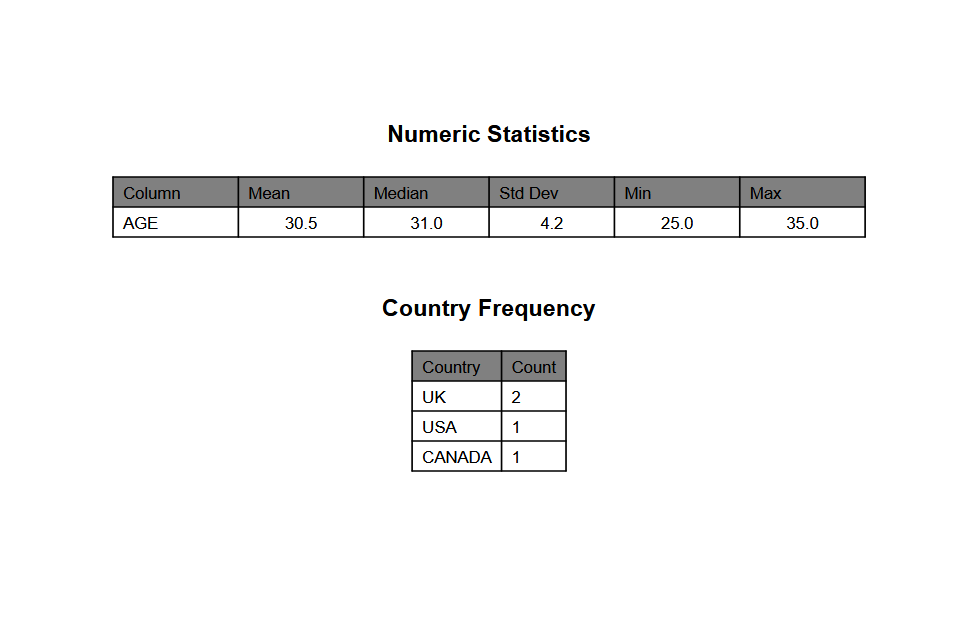
For numeric columns, the API calculates:
- Mean
• Median
• Standard deviation
• Minimum and maximum
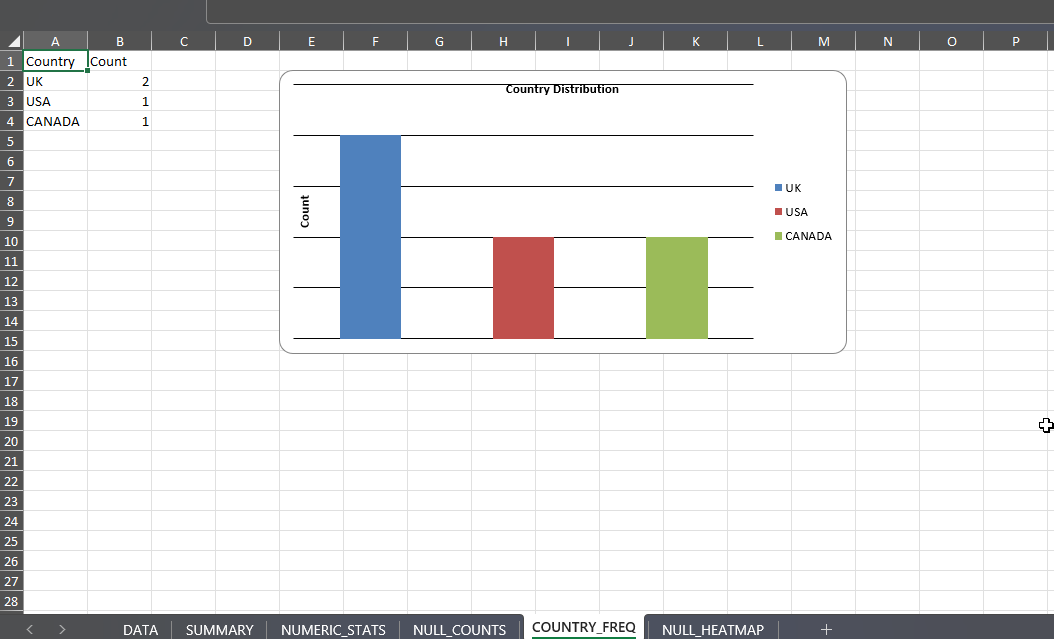
For categorical data such as Country or Nationality, it generates frequency tables and visual charts.
📊 7. Generated Excel Report (Show Output)
The processed Excel file includes multiple structured sheets:
- DATA – Clean dataset
• SUMMARY – Core metrics
• NUMERIC_STATS – Statistical analysis
• NULL_COUNTS – Null distribution
• COUNTRY / NATIONALITY frequency tables

Sheet NUMERIC_STATS
Sheet COUNTRY_FREQ
The system also generates:
- Bar charts
• Distribution visualizations
• Data quality color indicators
• Null heatmap visualization
This transforms raw data into a structured analytical report.
📄 8. Professional PDF Report (Show PDF)
In parallel, the system generates a branded PDF report.
The PDF includes:
- Logo and branding
• Original vs processed structure
• Data quality metrics
• Duplicate removal summary
• Null analysis
• Statistical tables
• Distribution summaries
• Footer and page numbering
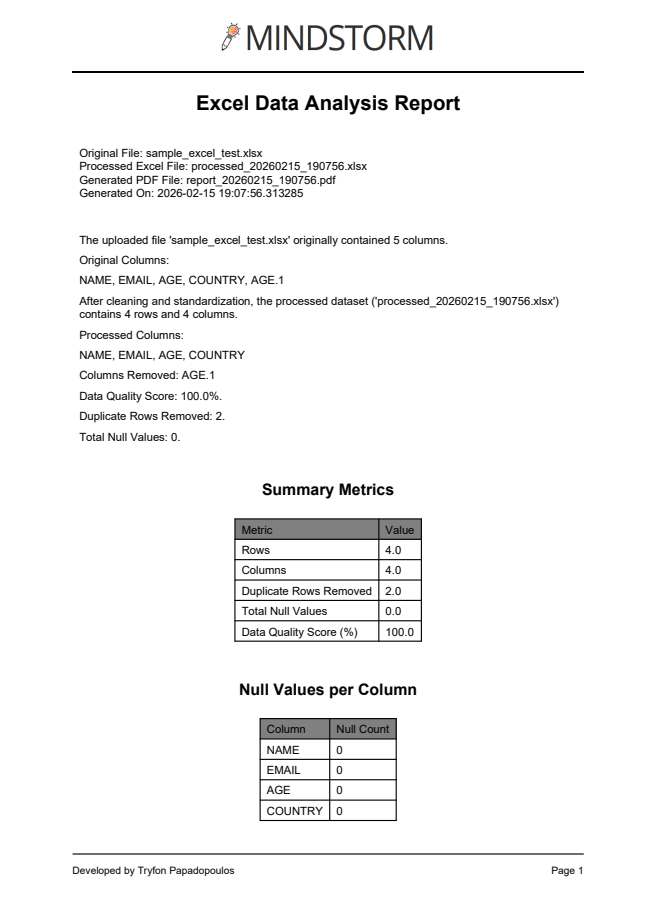
This makes the output ready for presentation or stakeholder reporting.
🧠 9. Why This Matters
This solution demonstrates:
- Backend API deployment on Railway
• Frontend integration through WordPress
• Automated data validation
• Automated reporting generation
It removes manual Excel cleaning and replaces it with a reproducible, scalable pipeline.
🚀 10. Use Cases
“This type of system can be used in:
- Data auditing
• Business intelligence preprocessing
• HR dataset validation
• Academic research preparation
• Client data onboarding pipelines
It significantly reduces manual data preparation time.”
🎬 11. Conclusion
To summarize:
WordPress handles the interface.
Railway handles the processing.
Python handles the intelligence.
Upload → Clean → Analyze → Visualize → Export.
The entire process runs online and automatically.
Full path: “C:\PythonPrograms\python-api\app.py”
Feel free to contact me for any business inquiries: info@mindstorm.gr




Comments are closed.